
Technical guide
How can a custom code inventory be made meaningful for transformation and maintenance decisions?
An inventory becomes meaningful when it answers the same questions, to the same standard of evidence, for every unit of custom code: is it used, who owns it, what does it depend on, how often does it change, which critical process does it carry, and what is its technical risk? Those answers are tied to a decision category, and units that cannot be classified stay visible on a separate list.
- Prepared by Castintech
- Last verified 23 September 2026
- 11 min read
- Sources
In this guide
Sections
Scope. This guide is a general inventory method for custom code developed in the ABAP® programming language on SAP® software. The analysis tools and checks available vary with the product and release; whether the SAP tools mentioned here exist in your landscape, and in what scope they work, should be confirmed separately. A short explanation of why an inventory should be more than an object list is on the Custom code inventory and technical debt page.
Why should the unit of an inventory be a function, not an object?
Deciding object by object is hard, because a business function is usually a group: a program, the classes it relies on, tables and interfaces. Retiring part of that group while keeping the rest usually makes no sense. In the inventory, the decision is made for that functional group, the decision unit, and the objects are listed underneath it.
The decision-unit approach also makes conversations with business owners easier. A process owner will not recognise an object name, but will recognise a description such as “the extra check used in order approval” and can say whether it is still needed.
Text description of the diagram
Start: the raw object list; unnamed marks for programs, classes, tables and interfaces. The number of rows hints at the workload; it does not settle the decision. Objects that together perform one business function are grouped inside three dashed decision units; objects that fit no unit stay on a separate list and are not connected to the spine. Every decision unit passes the same evidence standard: evidence of use (with its measurement period; no usage record only shows it was not seen in the measured period), business ownership, dependencies with direction, change frequency, link to a critical process and technical risk (code check findings with check variant and date). The spine leads to decision point 1: is the evidence complete and consistent? If so, the unit goes to one of four outcome categories: keep, adapt, return to standard or retire; each category's next step is written down. If evidence is missing or contradictory, the unit is not forced into a category; a dashed path goes to the 'investigate' node, where the missing evidence and the decision owner are identified. Priority is set by assessing the link to a critical process and technical risk together. There is no loop. The objects are representative and unnamed; the diagram is not a table or an inventory screen. On mobile the diagram reads as three panels in order: 1/3 from raw objects to decision units, 2/3 the same evidence standard, 3/3 decision category. Colophon: Castintech, D2, September 2026; technical explanatory diagram, not an SAP® product interface.
Step 1: How are decision units defined?
In the first step, objects are grouped by the business function they deliver together. The development structure the objects sit in, naming conventions, call relationships and shared tables are all used for grouping. Objects that fit no group go on a separate list of “objects without a unit”; this list is often where old experiments and leftovers are found.
Each unit gets a short functional description, written so a non-technical reader can follow it, stating which process it is used in.
Step 2: How is evidence of use gathered?
Evidence of use comes from usage data recorded at runtime, and it is always written down with its measurement period. If that period does not cover periodic processes such as month-end, quarter-end and year-end closing, the absence of use does not count as evidence for units tied to those processes.
Periods not covered are stated explicitly in the inventory.
When interpreting usage data, keep in mind that:
- scheduled jobs run regularly without any user; the fact that they run does not prove a business need
- interfaces called from other systems do not show up in user screens
- one part of a unit may run while another part never does
- use in test and development systems is not mixed up with production use
Step 3: How is business ownership confirmed?
Each decision unit is matched to a process owner, who is asked whether it is still needed. The technical team can explain what the code does, but the process owner decides whether the business needs it. Units without a traceable owner are taken to management as a separate decision item.
Questions for the process owner:
- Which business outcome does this function support today?
- How would the process run without it?
- Could a standard capability now meet this need?
- Who will take ownership of this function?
Step 4: How are dependencies mapped?
Dependencies are mapped through static analysis, from the source, without running the code. For each unit, three directions are recorded: the standard objects the unit uses, the other custom objects it uses or that use it, and its interfaces with external systems. A dependency list without direction cannot tell you what a change will affect.
Dependencies on standard objects are the main source of upgrade and transformation risk. Dependencies on other custom objects affect retirement decisions: a unit that looks unused may contain a helper that another unit calls.
Actual product screen
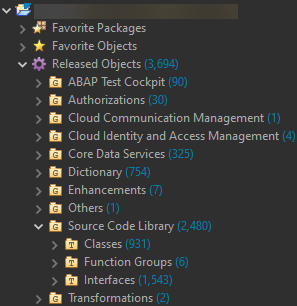
Scroll horizontally to read the screen, or select the image to open it at full size.
What the screen shows The “Released Objects” tree in the development environment’s project explorer: objects grouped by type and listed with their counts.
Decision it explains When dependencies are extracted, whether each standard object used appears in this list is recorded as a separate field; a dependency on an unreleased object is an input to the technical risk assessment.
Data The image contains no business data; only object categories and counts are visible. The project name is masked in the source image by SAP.
Product: ABAP Development Tools Source: SAP-samples/abap-cheat-sheets © 2022 SAP SE or an SAP affiliate company and abap-cheat-sheets contributors License: Apache License 2.0, used without modification
Step 5: Why add change frequency and links to critical processes?
Change history tells you two things: whether the unit serves a live need, and how much risk it carries with each change. A unit that changes often is likely to be needed, and it also needs attention at every upgrade because each change adds risk.
A unit that has not changed for a long time may be stable, or it may have been forgotten; the difference is again settled by evidence of use and ownership.
The link to critical processes states what happens if the unit stops working: does a process such as ordering, shipping, invoicing or statutory reporting stop or slow down, or is only a report missing? Together with technical risk, this is the main axis for setting priority.
Step 6: How is technical risk assessed?
Technical risk is assembled from several sources. SAP describes the ABAP Test Cockpit (ATC) as a tool for static and dynamic quality checking of ABAP code [1]; ATC covers areas such as performance, security, syntax and naming conventions [2]. For a move to SAP S/4HANA® software, checks are also provided that help identify critical uses of simplified SAP objects [2].
Add the following to those findings:
- the clean core level, where the A–D model defined in the context of SAP Cloud ERP Private can be used [4][5]
- automated test coverage
- whether documentation exists and is current
- knowledge concentration risks, such as very few people understanding the unit
According to SAP documentation, some checks may not be available on older releases, in which case the code can be analysed remotely from a more current central check system [3]. Each finding record states which check variant was used; otherwise results taken at different times cannot be compared.
How are classification and prioritisation done?
Each decision unit is placed in a decision category based on the evidence gathered. The categories describe the work to be done, not the number of technical findings. Five categories are used: keep, adapt, return to standard, retire and investigate. Units whose evidence is missing or contradictory are not forced into a category; they stay in “investigate”.
| Decision category | Typical condition | Next step |
|---|---|---|
| Keep | Used, has an owner, technical risk is acceptable | Update documentation, keep monitoring |
| Adapt | Used and needed; has findings that affect an upgrade or transformation | Plan the adaptation scope and its testing |
| Return to standard | The need continues; standard capability may now meet it | Confirm the standard solution, plan the switch |
| Retire | No evidence of use, and the process owner confirmed it is not needed | Plan a removal step that can be reversed |
| Investigate | Evidence is missing or contradictory; no owner found | Identify the missing evidence and the decision owner |
Prioritisation uses two axes together: the link to critical processes and technical risk. Units high on both go first. Units with a strong link to critical processes but low technical risk are kept and monitored. For units with high technical risk but a weak link to critical processes, retiring them or returning to standard is considered first.
What can inventory output not tell you?
An inventory is a strong decision tool, but it has limits, and they should be stated plainly in the output:
- A missing usage record is not conclusive proof of non-use; it only shows that no use was seen in the measured period.
- The number of findings does not show workload on its own; the same kind of finding can take very different effort in different units.
- Static analysis does not say whether a business rule is correct.
- An inventory is a snapshot; new development and upgrades make it go stale.
- Tool output is limited by the check variant and release in use.
Which fields should an inventory record hold?
| Field | Description |
|---|---|
| Decision unit | Name of the functional group and a short functional description |
| Objects | Objects belonging to the unit |
| Process and business owner | The process the unit serves, and its owner |
| Technical owner | The person or team who knows the unit and is responsible for changing it |
| Evidence of use | Usage status and measurement period |
| Dependencies | Standard objects, other custom objects, interfaces (with direction) |
| Change history | Last change and change frequency |
| Link to critical process | What happens if the unit stops working |
| Technical findings | Summary of findings, check variant used and date |
| Decision category | Keep, adapt, return to standard, retire, investigate |
| Evidence type and assumptions | The evidence behind the decision and any unconfirmed assumptions |
| Decision date and approver | When and by whom the decision was made |
Common wrong assumptions
- “The number of objects shows the workload.” It does not. Workload depends on the decision categories and on how complex the units in each category are.
- “Unused code carries no risk.” It can: it may contain security weaknesses, it produces findings in upgrade checks and it clutters the inventory.
- “Migration checks replace the inventory.” Migration checks find specific incompatibilities; they do not answer questions about use, ownership and need.
- “The technical team can complete the inventory alone.” Decisions on need and ownership come from process owners.
- “A unit stays in the category it was first given.” As processes, releases and standard capability change, the category can change too.
Checklist
- Objects are grouped into decision units; objects without a unit are on a separate list
- Each unit has a non-technical functional description
- Evidence of use is recorded with its measurement period; uncovered periods are stated
- A process owner is found for each unit, or the lack of one is recorded
- Dependencies are mapped with their direction
- Change history and links to critical processes are added
- Technical findings are recorded with check variant and date
- Each unit is placed in a decision category
- Prioritisation is done on two axes
- Assumptions and the limits of the inventory are written into the output
Limits of this guide
This guide is a general technical explanation. Information about SAP tools and checks rests on the documents in the sources and depends on the release. The decision-unit approach, decision categories and prioritisation axes are Castintech’s assessment framework and should not be read as SAP’s view. This guide does not predict the duration or outcome of any particular inventory.
Frequently asked questions
Is working object by object wrong?
No; technical analysis is done at object level anyway. But the decision should be made for the whole group of objects that make up a business function. Otherwise part of a function may be retired while another part is kept.
What should happen to code without an owner?
The lack of an owner is a decision item in its own right and goes to management. Until a decision is made, the unit stays in the “investigate” category. If there is no evidence of use either, a reversible trial deactivation can be considered as an option.
How detailed should an inventory be?
As detailed as the decision requires. To set the scope of a transformation, the decision-unit level is often enough; to plan adaptation work, units in the “adapt” category need to be examined at object level.
Do SAP S/4HANA migration checks replace an inventory?
No. These checks help identify critical uses of simplified SAP objects [2]. They do not say whether a unit is used, who owns it or whether it is still needed; those questions are answered by the other dimensions of the inventory.
Can an inventory produce a workload estimate?
It can produce a directional estimate, not a precise one. The estimate should rest on the spread of decision categories and on explicitly written assumptions, and it should be updated as those assumptions are confirmed.
Related pages and guides
- Custom code inventory and technical debt: why an inventory is a decision tool
- Extension decisions under a clean core approach: the level model and assessing new extensions
- Technical uncertainties before a transformation: where the inventory sits in a transformation plan
- All technical guides
Sources
Bracketed numbers in the text refer to the sources below.
- 1
Quality Checking with the ABAP Test Cockpit (ATC) — help.sap.com, ABAP platform documentation.
Source date: document version 2025 FPS01 (February 2026) Last verified: 23 September 2026
- 2
Static Code Checks in the Context of an SAP S/4HANA Migration — help.sap.com, ABAP platform documentation.
Source date: document version 2025 FPS01 (February 2026) Last verified: 23 September 2026
- 3
Usage Scenario and Technical Requirements — help.sap.com, ABAP platform documentation.
Source date: document version 2025 FPS01 (February 2026) Last verified: 23 September 2026
- 4
Extensibility — help.sap.com, SAP Cloud ALM application help.
https://help.sap.com/docs/cloud-alm/applicationhelp/extensibility
Source date: not stated on the page Last verified: 23 September 2026
- 5
Clean core extensibility: Creating scalable, upgrade-ready extensions for the Autonomous Enterprise — SAP white paper, section 3.3 (pp. 19–22).
https://www.sap.com/docs/download/2024/09/20aece06-d87e-0010-bca6-c68f7e60039b.pdf
Source date: no explicit publication date in the document; p. 52 shows “(08/26)” and “© 2026” Last verified: 23 September 2026
Last verified: 23 September 2026
SAP, ABAP, and SAP S/4HANA are the trademarks or registered trademarks of SAP SE or its affiliates in Germany and in other countries.
This content has been independently prepared by Castintech.
Independence note
- Castintech does not claim any partnership, authorization, endorsement or sponsorship relationship with SAP SE.
- SAP and the SAP product names mentioned on this page are trademarks of SAP SE or its affiliates.
- The work Castintech offers is independent technical consulting and support.