
Topic page
Integrating with SAP® software: what needs deciding before the connection
The lasting cost of an integration rarely sits in the connection itself. It sits in the decisions nobody took before the connection was built. This page sets out which questions should be answered first when data and processes flow between SAP® software and other systems, and how the Castintech team approaches them.
- Prepared by Castintech
- Last verified 23 September 2026
- 10 min read
- Sources
On this page
Sections
This content is a general technical explanation, not implementation guidance for a specific product release or installation.
Where we can work together in this area
Castintech approaches technical questions about enterprise systems as independent technical consulting. The scope of the work is defined together, based on the current state of the system and the available evidence.
- Integration design and review of existing interfaces
- Custom code inventory and technical debt assessment
- Performance investigation and preparation of measurement evidence
- Technical preparation and a list of open questions before a transformation
- Written options and impacts for technical decisions
Discuss the technical scope The first conversation is for clarifying the scope of the topic and the evidence it needs.
Why is integration more than making a connection?
A connection shows that two systems can pass messages to each other. It does not show that the integration works correctly. The real work is agreeing in advance, and in writing, which system holds the correct value for each piece of data, what happens when a message is lost or arrives twice, and who resolves an error, with what information.
A call that succeeds in a test environment says nothing about production load, timeouts, simultaneous updates to the same record or partial success. If these cases are not defined at design time, decisions tend to be made in the middle of an incident, with incomplete information. For management, the result is effort spent on reconciliation, delayed processes and errors that nobody clearly owns.
How are system boundaries and data ownership decided?
Each piece of data gets a single source of truth: which system creates the record, which system may change it, and whether other systems keep a copy or ask for it when needed. An integration built without these decisions in writing can leave two systems each treating a different value for the same data as correct.
Before implementation, the following should be settled:
- which system owns master data and which owns transactional data
- whether the same record can be changed in more than one system
- which value wins when there is a conflict
- how deletions and cancellations reach the other systems
- how business keys such as document numbers are matched across systems
Should the flow be synchronous or asynchronous?
The decision rests on the business requirement before the technical preference: can the caller carry on without waiting for the answer? A synchronous call suits cases where the result is needed immediately, provided it is accepted that the calling process stops when the other system slows down or is unavailable. An asynchronous flow reduces that dependency but requires status tracking.
| Question | Points to synchronous | Points to asynchronous |
|---|---|---|
| Does the user need to see the result immediately? | Yes | No, a later notification is enough |
| What should happen if the other system is unavailable? | The operation can stop | The operation can wait and be processed later |
| Does message order matter? | Order is easier to keep with a single caller | Order has to be designed explicitly |
| Does the load fluctuate? | Depends on the other system’s capacity | A waiting area can spread the load over time |
Which error classes should be handled separately?
At least four classes should be kept apart: transient technical errors that may succeed on a retry, permanent technical errors that will not pass until something is fixed, business errors where the data breaks a business rule, and timeouts where the outcome is unknown. For each class, decide whether it is handled automatically or needs a human decision.
Timeouts deserve particular attention. When the caller gets no answer, it cannot know whether the operation on the other side went through. That uncertainty shapes the whole reprocessing design. Error classes, retry policy and the limits of manual intervention are covered in detail in the guide Error handling and safe reprocessing in integrations.
Text description of the diagram
Start: an incoming message carrying a transaction ID that does not change across retries. Decision point 1: the error class, judged by cause and by what a retry would do, not by message text; four classes are separated. The upper layer is the automatic policy. For an unknown outcome, the status is checked first; if the operation happened, there is no retry and the message counts as processed. If it did not happen or cannot be queried, it reaches decision point 2 together with transient technical errors: is the operation idempotent? If yes, the limited automatic retry loop runs: maximum number of attempts, increasing wait and random variation, overall time limit. The loop is bounded by a counter 1, 2, …, n. If a retry succeeds, the message is processed: the same transaction ID is not applied twice. When n is reached or a criterion is triggered, the loop stops: attempt or time limit, the same permanent error repeating, a maintenance window, an error-rate threshold, a broken order rule or doubt about data integrity; the stop decision is recorded. If the operation is not idempotent, there is no automatic retry. These two paths, the permanent technical error and the business error go down into the human decision layer below the layer boundary: waiting for a human decision; the message is not lost. The technical team decides on permanent technical errors, the process owner on business errors. There are three actions: correct and resend under control (idempotency and order are confirmed; bulk resends are tried on a small sample first), complete or compensate (after partial success, following a business rule written in advance), skip or cancel (the business side is notified). Boundary: business data is corrected through normal business transactions, not by editing the database directly. At the end, the audit trail records the message ID and business key, every status change, automatic retries, the stop decision and each intervention; regular reconciliation compares counts, amounts or keys on both sides and brings to light losses that never show up in error records. The only loop is the automatic retry loop, and it is bounded. On mobile the diagram reads as four panels in order: 1/4 message and error class, 2/4 status check and idempotency, 3/4 limited retry and stopping, 4/4 human decision, audit trail and reconciliation. Colophon: Castintech, D3, September 2026; technical explanatory diagram, not an SAP® product interface.
Why do reprocessing and idempotency belong together?
When a message is sent again, the receiving system must not apply the same operation twice. Idempotency means that processing the same request several times has the same effect as processing it once. Automatic retries added without designing for this can create duplicate records, and then extra work to clean those duplicates up.
In practice, each business operation carries an identifier that stays the same across retries, and the receiving system can check whether it has already processed that identifier. Where order matters, a separate rule prevents an older message from overwriting a newer state.
What should be recorded for traceability?
It should be possible to say which system a business record came from, which steps it went through and where it stopped, without reading technical logs. To make that possible, each message carries a correlation ID and a business key, status changes are stored with a timestamp, and error records contain information the person fixing the problem can understand.
Minimum fields:
- correlation ID and business key
- source and target system
- status and the time it changed
- number of attempts
- error class and a readable error description
- the user who intervened and what they did
Keeping personal or sensitive data out of logs and monitoring records unless it is needed is also part of designing for traceability.
Actual product screen
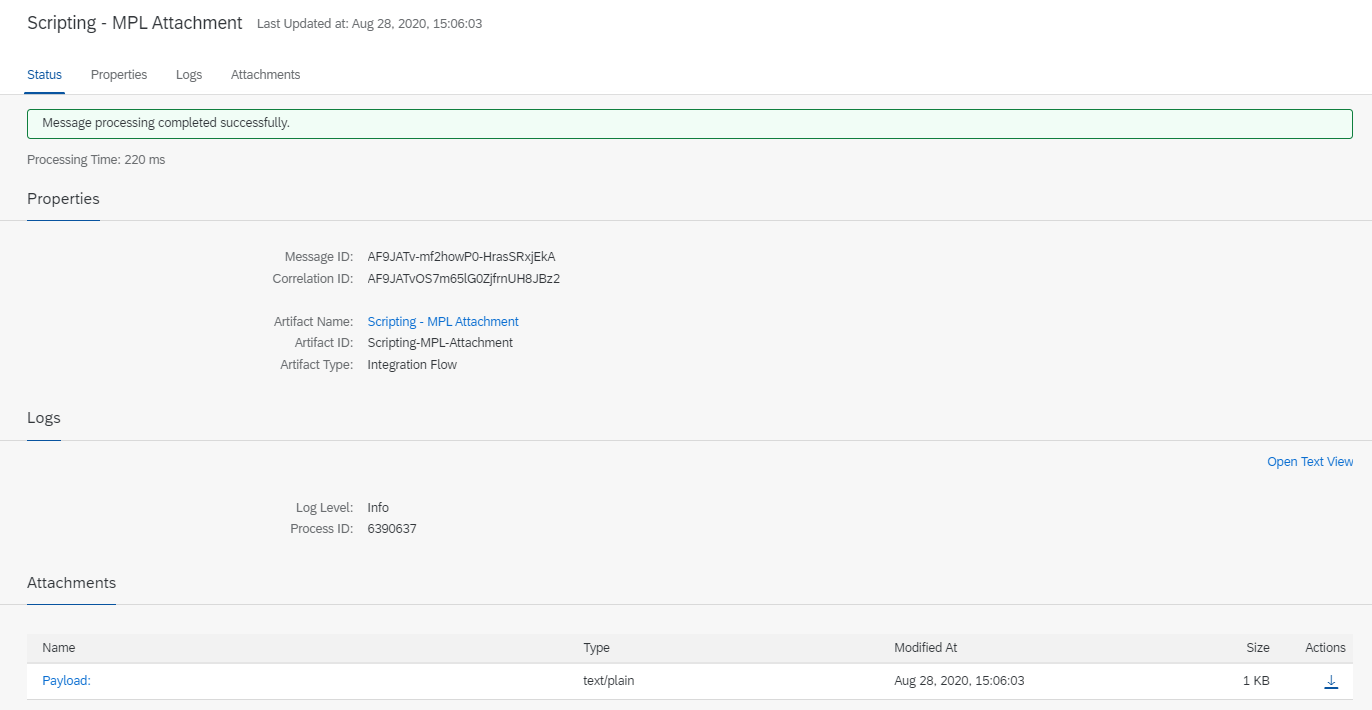
Scroll horizontally to read the screen, or select the image to open it at full size.
What the screen shows A single message’s processing log in the integration platform’s monitoring view: status (“Message processing completed successfully”), message and correlation IDs, the integration flow’s name and the log level.
Decision it explains When deciding which fields to record for traceability, the fields in this log can serve as a reference: the message ID identifies a single transmission, and the correlation ID lets related transmissions be followed together.
Data The log belongs to the sample integration flow in the SAP documentation; according to the source, the flow is called with a dummy payload. The IDs shown are test IDs; there is no customer or business transaction data.
Product: SAP Integration Suite (Cloud Integration) Source: SAP-docs/btp-integration-suite © 2022-2023 SAP SE or an SAP affiliate company and btp-integration-suite contributors License: CC BY 4.0, used without modification
Where are the security and authorisation boundaries drawn?
Each integration user should be able to do only what its own flow requires. Giving a technical user broad permissions speeds up setup, but it removes any limit on the impact of a mistake or misuse. Authorisation design covers the authentication method, how credentials are stored and who is allowed to resend messages.
- technical users are separated per flow
- credentials are never held as plain text in code or configuration files
- renewing credentials is a process with a named owner
- viewing, correcting and resending a failed message are assessed as separate permissions
- protection requirements for data in transit and at rest are defined
How are lifecycle and change impact managed?
An integration is a contract between two sides that both keep changing. A field change, a release upgrade or a process change on one side can affect the other. That is why each interface’s version, owner, consumers and change notification route are recorded from the start, so anyone affected by a planned change can be seen in advance.
The choice of interface directly determines upgrade impact. In SAP’s clean core extensibility model, extensions that use only released interfaces and extension points are classified at the highest level (Level A) [2][3]. The model is defined in the context of SAP Cloud ERP Private [3]; how it applies to your own landscape should be checked against your product and release scope. More detail: Extension decisions under a clean core approach.
What should be checked for your own landscape?
The tools and services available for integration vary with the installed product, the release and the licence scope. So nobody should assume a given tool exists in every landscape. Before design starts, confirm which interfaces are available, which middleware layer will be used and who will operate it, and record any scope that cannot be confirmed.
For example, SAP describes SAP Business Technology Platform (SAP BTP) as a platform for integrating, automating and extending applications and processes [1]. Whether SAP BTP is used in a particular landscape depends on the organisation’s product scope, architecture decisions and operating model; it is not a component every installation has.
Which uncertainties should be resolved before implementation?
Any question below that is answered with “we don’t know” should go into the decision log before implementation starts:
- Which system is the source of truth for each piece of data?
- Is the flow synchronous or asynchronous, and why?
- What happens if the same message arrives twice?
- Does message order matter, and how would a break in order be noticed?
- How is the outcome of an operation found out after a timeout?
- Which errors are handled automatically and which need a human decision?
- Who monitors failed messages, and with what permissions do they intervene?
- Which interface is used, and how would an upgrade affect it?
- Where are credentials held, and who renews them?
- When one side changes, how does the other side find out?
What does this page not claim?
This page is a general technical explanation. It is not implementation guidance for a specific product release, licence scope or installation. We do not claim the approach will deliver any particular timeline, cost or performance outcome. Product- and release-dependent information is given with its source and last verification date, and should be checked again in your own landscape.
Frequently asked questions
What document should integration design start from?
A decision log per flow: which data moves, in which direction, triggered by what and under which ownership rule. The technical specification is written on top of that log. When the order is reversed, business rules end up scattered through the code and are hard to find later.
Should every integration be asynchronous?
No. An asynchronous design reduces the dependency between systems, but it requires status tracking, order management and notifying the user later. Where the result must be seen immediately and the other system’s availability is acceptable, a synchronous call can be the simpler solution.
Who should manage failed messages?
The technical team can see why a message stopped, but for a business error it is usually the process owner who decides how the data should be corrected. So the technical owner of the error queue and the owner of the business decision are named separately.
Can the effect of an upgrade on integrations be known in advance?
Not completely, but the uncertainty can be reduced. If you know which interfaces are in use, whether each one is released and who consumes it, you can decide in advance where upgrade testing should focus.
Does this approach apply to systems other than SAP?
The principles of data ownership, error classes, idempotency and traceability do not depend on the product. What is product-specific is the set of interfaces and tools available and their scope in each release.
Related guides and pages
- Error handling and safe reprocessing in integrations: error classes, retries and the limits of manual intervention in detail
- Extension decisions under a clean core approach: how the choice of interface affects upgrades
- Technical uncertainties before a transformation: where integrations sit in a transformation plan
- Custom code inventory and technical debt
- Our working approach
Sources
Bracketed numbers in the text refer to the sources below.
- 1
SAP Business Technology Platform — sap.com product page.
https://www.sap.com/products/technology-platform.html
Source date: not stated on the page Last verified: 23 September 2026
- 2
Extensibility — help.sap.com, SAP Cloud ALM application help.
https://help.sap.com/docs/cloud-alm/applicationhelp/extensibility
Source date: not stated on the page Last verified: 23 September 2026
- 3
Clean core extensibility: Creating scalable, upgrade-ready extensions for the Autonomous Enterprise — SAP white paper, section 3.3 (pp. 19–22).
https://www.sap.com/docs/download/2024/09/20aece06-d87e-0010-bca6-c68f7e60039b.pdf
Source date: no explicit publication date in the document; p. 52 shows “(08/26)” and “© 2026” Last verified: 23 September 2026
Last verified: 23 September 2026
SAP is the trademark or registered trademark of SAP SE or its affiliates in Germany and in other countries.
This content has been independently prepared by Castintech.
Independence note
- Castintech does not claim any partnership, authorization, endorsement or sponsorship relationship with SAP SE.
- SAP and the SAP product names mentioned on this page are trademarks of SAP SE or its affiliates.
- The work Castintech offers is independent technical consulting and support.